Android Phones on a Mac: Why ADB Beats MTP for Moving Files
A Mac cannot open an Android phone as a folder, because macOS has no MTP support. This sets ADB and MTP side by side, from the documents, then shows what I measured moving files between two phones and a Mac with ADB, and the small always-on page I built as the worked example. It says plainly what I did not measure.
I plugged an Android phone into my Mac and nothing happened. There was no drive in Finder, no folder to open and no way to drag a photo out. The Mac was set up after my Windows PC, where the same phone opens as a folder, so I had expected it to just work. It can’t, because the Mac has no support for MTP, the protocol the phone uses to share its files. On Windows I have a different problem: copying from one phone to another through the computer over MTP is very slow, but I did not measure that, and I will not give a number for it. So I used ADB, Android’s debug bridge, and built a small page around it. This article sets ADB and MTP side by side for moving files and uses that page as the worked example. The page is a personal tool in a private repository, so there is nothing to install. This piece stands alone, and the Mac in it is the one from part 1 of From Windows to Mac.
The portal, as built
This is the page I built, drawn as the software it is, from the chat where I asked for it. A browser tab holds the two panes. A small server on the Mac answers only that browser, behind a front door that checks the request. It talks to the adb server on the Mac, and the adb server talks to a daemon on each phone, over a cable or over Wi-Fi. The picture plays by itself and follows one 1 GB clip from a Pixel on USB to a Samsung on Wi-Fi. Press a box to jump to its step, or pause it.
The speeds on the picture are my own measurements, on two phones with USB 2 cables. The meter stays at zero because no model runs when I copy a file. The rest of the article explains the parts. Section 1 is why a Mac needs this at all, sections 2 and 3 are what ADB does differently from MTP, section 4 is how the page was built, and section 6 is every number I measured.
1. Why a Mac does not open a phone as a folder
When you plug in a phone and choose File transfer, it does not show you a disk. A disk would be a long run of numbered blocks, and your computer would run its own file system on top of them. A phone does not hand that over. MTP, the Media Transfer Protocol, works one level higher: the computer asks for files and folders by name, and the phone does the work and keeps its own file system in order. One result is that a pulled cable does not leave a half-mounted disk. The other result is that something on the computer has to speak MTP.
Windows has an MTP client built in, and even there the phone gets no drive letter. It shows up as a named device in File Explorer. macOS has built-in support for PTP, which Image Capture uses for photos, but not for MTP. Open-source MTP code exists, and third-party apps use it, but they show the phone in their own window and do not mount a drive.
So a missing Finder folder is not a fault in your cable or your Mac. It is the design. The question is what to use instead.
2. Two ways to ask a phone for a file
Here is one file in each protocol, in order. The picture at the top walks the ADB half through the portal, in steps 7 to 9.
MTP: an announcement, then the bytes.
- SendObjectInfo: the file name, its size, the folder and the type.
- The phone answers with an object handle, or with an error such as storage full, and adds the object to its own database.
- SendObject: the file bytes, which must match the size announced in step 1.
- The phone answers OK. For the next file, start again at step 1.
ADB: a stream.
host:transport, thensync:: pick the phone by its serial and switch the connection to file-sync mode.SENDwith the path and the mode: where the file goes and its permissions. The adb server relays it to the phone.DATA,DATA,DATA: the file bytes, up to 64 KiB each. The total size is not sent first.DONEwith the file’s modified time, then the phone answersOKAY, orFAILwith a text.
The order and the names come from the MTP operations list, Android’s MTP server source and the adb file-sync notes.
Three things stand out.
- MTP talks about objects. Each file is announced first with its name, size and folder, then sent, and the phone adds an entry to its own object database. Android’s own MTP server checks the free space at the announce step, before any bytes move.
- ADB moves a stream. Android’s documentation describes three parts: a client, a server on your computer and a daemon on the phone. The file-sync service reads or writes one file in chunks of up to 64 KiB, and a write does not announce a total size first.
- The adb server listens on TCP port 5037 on the Mac. So any program on the Mac can be a client. I did not need a vendor’s app. I wrote a small client that speaks the sync service.
A correction I had to make
I expected to write that MTP has no random access. The sources say otherwise. GetPartialObject, a byte-range read, is in the MTP 1.1 specification. Android adds a 64-bit offset and partial writes (SendPartialObject, BeginEditObject and friends), but the host operating system and its client have to support those as well. So partial reads are not an advantage of ADB. What ADB gives me is something else.
3. What ADB gives you, and what MTP does better
No. macOS has built-in support for PTP (Image Capture) but not for MTP. You need a third-party MTP client.
Install Android's platform-tools once. Then any program on the Mac can use it. The phone needs Developer options, USB debugging and one Allow tap.
An object. For each file: SendObjectInfo (name, size, folder), then SendObject (the bytes). The phone records every object in its own database.
A stream. STAT, then SEND or RECV, then data chunks of up to 64 KiB, then DONE.
Reads: yes, GetPartialObject is in the MTP 1.1 specification. Writes: only through Android extensions that the host and its client must also support.
Reads: stop a stream early, or ask the phone's own dd for a byte range. Writes: whole files through sync; anything else through the phone's shell.
On Windows an MTP device gets no drive letter or path, so tools that expect a path cannot use it.
Any program can talk to the adb server on this Mac, which listens on TCP port 5037.
Not checked. Windows has MTP over IP, but I did not look for a phone-side wireless MTP option.
Wireless debugging on Android 11 and higher: same network, pair once with a code or QR.
I found no checksum operation in the MTP operations I read. A client can read the object back. I did not read every vendor extension.
Run the phone's own md5sum and compare. The portal does this on a sample, or on every file if you tick the box.
The phone keeps its own file system in order, so there is no half-mounted disk. A partial file may be left behind.
The Mac writes into the phone's storage with debugging rights. The portal writes under a hidden name, checks, and only then renames.
Nothing to switch on. This is MTP's real advantage.
USB debugging gives the Mac a shell on the phone, so you must trust that Mac.
For me, three things decided it.
- It works on a Mac with no vendor app. Install Android’s platform-tools once, and any program can use it.
- It is a plain stream that a script can drive. That let me stream phone to phone through the Mac’s memory, and ask the phone for its own md5sum to check each copy.
- It can be wireless on newer phones. Wireless debugging is documented for Android 11 and higher.
MTP does some things better, and an honest comparison says so.
- Nothing to switch on. ADB needs Developer options, USB debugging and an Allow tap. USB debugging gives the Mac a shell on the phone, so you must trust that Mac.
- The phone keeps its file system in order. With ADB, I wrote the safety rules myself: a hidden name while a file is copied, and a rename only after the check passes.
- The phone updates its own indexes. After an ADB copy the gallery does not know the new photos until something asks the phone to scan them. The portal asks, but that is one more thing I had to build.
4. The build, as attempt, flaw, next attempt
This is the real order of events, as a route with stops. Every flaw is one I hit myself.
Stop 0: Nothing mounts
Plug the phone into the Mac and look for it in Finder, the way Windows shows it in File Explorer.
Nothing appears. macOS has no MTP client, so the phone is never opened as a folder. It can still show photos through Image Capture, which speaks PTP, a different and narrower protocol.
This is not a broken cable or a missing driver. The phone offers its files in a language the Mac does not speak.
Three small ideas from that story, re-typed from scratch as examples. They are not the portal’s code.
Speaking the file-sync service
The adb server takes a four-digit hex length and then a text request. Send host:transport:SERIAL, then sync:, and the
connection turns into a binary conversation of 8-byte headers: a four-letter tag and a little-endian length.
import struct

def frame(tag: bytes, payload: bytes) -> bytes:
    return struct.pack("<4sI", tag, len(payload)) + payload

def read_exact(sock, n):
    buf = b""
    while len(buf) < n:
        part = sock.recv(n - len(buf))
        if not part:
            raise ConnectionError("the phone went away")
        buf += part
    return buf

def pull(sock, remote_path, out):
    sock.sendall(frame(b"RECV", remote_path.encode()))
    while True:
        tag, size = struct.unpack("<4sI", read_exact(sock, 8))
        if tag == b"DONE":
            return
        if tag != b"DATA" or size > 64 * 1024:
            raise ValueError("unexpected reply")
        out.write(read_exact(sock, size))
A file name is data, not a delimiter
A phone file name can contain a line break. If you split a listing on line breaks, one hostile name can fake a second row, such as a folder that is not there, and a later copy can land in the wrong place. Two habits close it.
import os

out = run_on_phone("find /sdcard/Pictures -mindepth 1 -maxdepth 1 -print0")

risky = out.decode().split("\n")
names = [n for n in out.split(b"\0") if n]

def inside(root, target):
    root = os.path.realpath(root)
    target = os.path.realpath(target)
    return os.path.commonpath([root, target]) == root
A name can never contain a NUL byte, so NUL is a safe separator. And every write target must resolve inside the folder the person chose.
Trust a phone on first contact, then hold it to that
A serial number is public on the network, so it proves nothing. Pin more than that the first time you see the phone on the cable, and refuse anything on Wi-Fi that does not match.
PINS = {}

def first_usb_contact(serial, model, build):
    PINS[serial] = (model, build)

def accept_wifi(serial, model, build):
    return PINS.get(serial) == (model, build)
The limit is real. A device that copies the serial, the model and the build exactly cannot be told apart, and a first contact with no cable is trust on first use.
Why the thumbnails are cheap
Both tricks need a reader that can take part of a file, which is why they suit a byte stream.
- Photos. In a JPEG, the Exif block sits right after the start of the file, and its segment cannot be larger than 64 KiB. The small preview image lives inside it. So reading the first 128 KB is enough for most phone photos, and the full file stays on the phone.
- Videos. An MP4 keeps its index (the moov box) at the start or at the end, so a reader fetches the index and the first bytes, and not the whole file. The viewer also streams with HTTP range requests, so a long video starts playing at once.
MTP can read byte ranges too (GetPartialObject), so these are not ADB-only tricks. They only needed a client I could write.
5. What the page looks like
Five views of the real page in a browser frame, in dark and in light. Press a tab, press a numbered pin, then switch the theme.
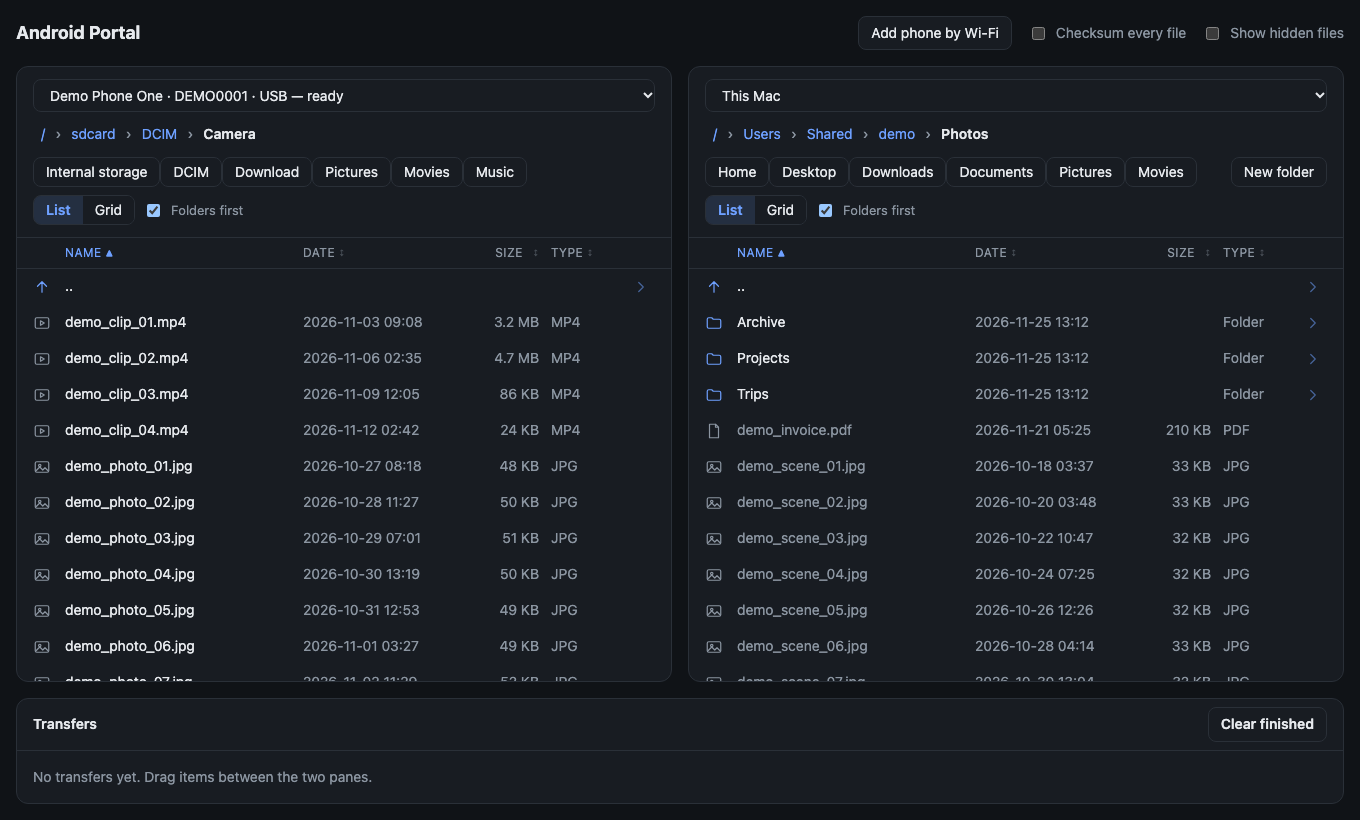
It runs as a background service on the Mac, so a plain bookmark opens it with no chat in the way. It starts again after a reboot. If no phone is plugged in, it says so and waits.
6. The numbers, and what I did not measure
Press the button and watch two copies of the same 1 GB file run side by side. Each clock stops at a time I measured.
| What | Value | How I know |
|---|---|---|
| 1 GB, phone to phone, streamed through the Mac | 34.8 s and 41.6 s (30.9 and 25.8 MB/s) | Measured Each direction, two phones on USB 2 |
| The same file, the old two-step way (to the Mac, then to the other phone) | 58.4 s and 60.9 s | Measured Each direction |
| 200 small files, phone to phone | About 5 to 7 s | Measured Both directions |
| Wireless against cable | About 17.5 MB/s against about 31 MB/s | Measured One phone on Wi-Fi |
| First attempt, exec-out and a shell write | About 7.5 MB/s. The older phone read at 5 MB/s | Measured First attempt, before the sync protocol |
| Photo thumbnails, 50 photos | About 2 to 3 s the first time, about 0.02 s from the cache | Measured Cold run, then cached |
| Thumbnail of a 1.7 GB video | About 2.5 s, without downloading it | Measured Reads the index and the start only |
| Speed of MTP on any machine | No number | Not measured I give no figure |
| Phone to phone through a Windows PC over MTP is very slow | My own experience | Reported Only reported by me |
| Whether USB 3 would be faster | Unknown | Not measured Both phones showed as USB 2 on this Mac |
| Reading that 1.7 GB video in full | About 55 s at 31 MB/s | Arithmetic Not a test |
| Wireless link after a phone reboot or a cable pull | Unknown | Not measured A dropped Wi-Fi link came back in 2 s on one phone |
I will repeat the gap, because it matters. I did not measure MTP, on a Mac or on Windows. My claim is about structure, taken from the specification and from Android’s source. One file means two MTP transactions plus a database entry for the phone, and a stream means none of that. Whether that costs minutes or seconds on your phone, I do not know. The very slow phone-to-phone copies I see on Windows are my experience, not a result.
A fair reading of my own numbers also pulls the credit away from ADB. The biggest win, 35 to 42 s against 58 to 61 s, came from streaming one phone into the other, not from the protocol. An MTP client that streamed the same way might do well. I never found one for the Mac, so I could not try.
7. Where this leaves me
- Use ADB when you are on a Mac, you want to script or automate a copy, or you want wireless on a recent phone, and you accept the trust cost of USB debugging.
- Use MTP when you are on Windows, you want nothing to switch on, and the built-in Explorer is fast enough for you.
- The portal is a personal tool in a private repository. It is not a package, there is no install command and there is no public link, and I will not invent one. If this is useful to you, the ideas in section 4 are the part that travels.
To read the sources behind the claims: